
Quick Summary
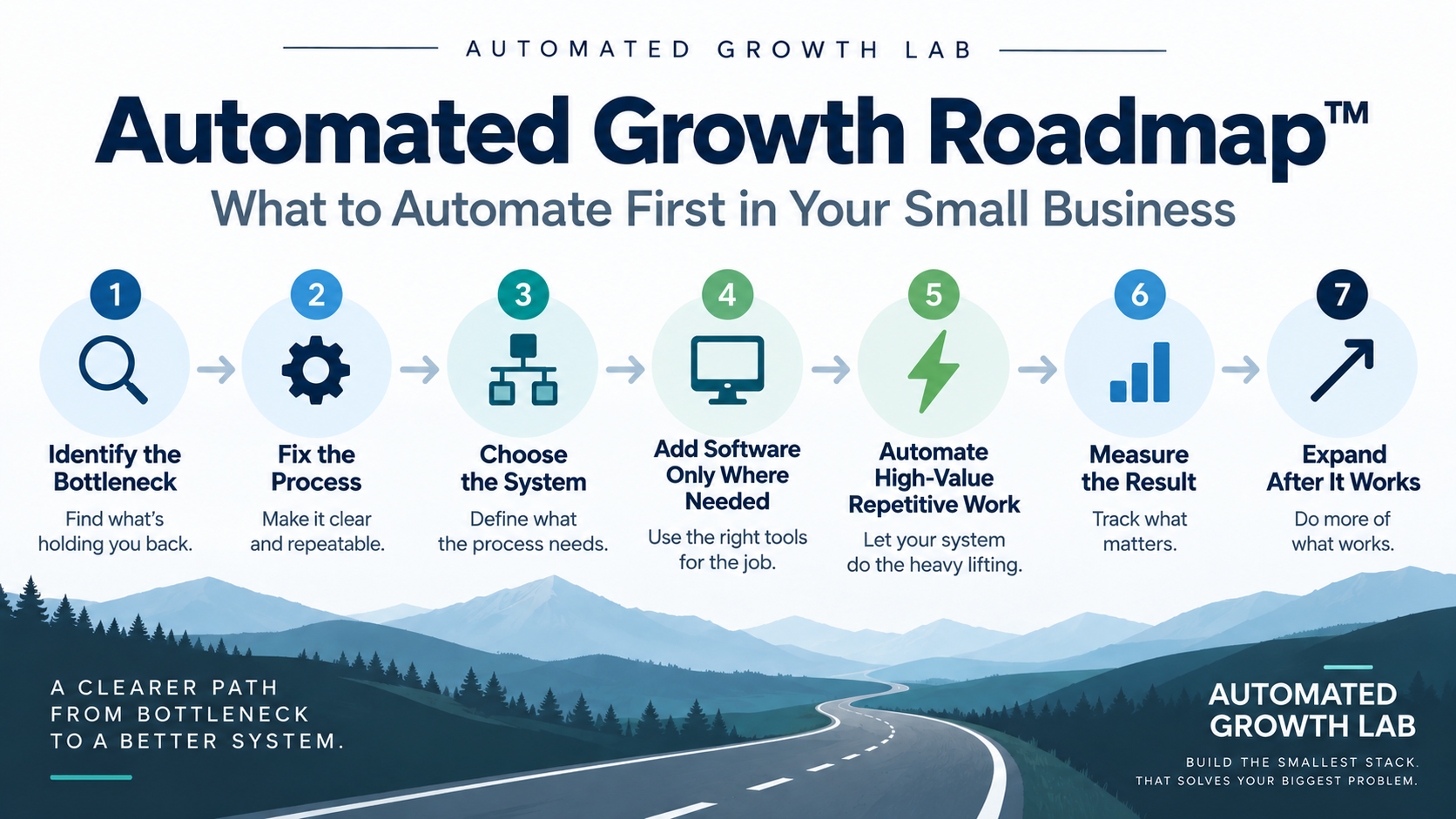
If you are wondering what to automate first in your small business, start with the bottleneck, not the software. The Automated Growth Roadmap™ walks you through seven steps: identify the constraint that is actually costing you time or money, fix the underlying process, choose the system that process needs, add software only where a real gap remains, automate the highest-value repetitive work, measure whether it helped, and expand only after the first system is working. This guide explains each step, walks through a realistic example, and gives you a short exercise to apply the Roadmap to your own business today.
Introduction
A lot of small businesses get into automation backward. If you are trying to figure out what to automate first in a small business, the best place to start is the problem, not the tool.
Maybe it is an AI assistant that can write emails. Maybe someone recommends a workflow builder. Maybe it is a CRM with a long list of automation features that sounds like something the business should already be using.
So you sign up, connect a few things, and automate whatever seems easiest. A few months later, you have three or four tools handling different pieces of the business, some of them overlap, and you are not really sure how much time any of it is saving.
Usually, the problem is the order.
Automation works best when the process underneath it already makes sense. If the workflow is unclear, inconsistent, or solving the wrong problem, automating it usually adds another layer of complexity.
That is what the Automated Growth Roadmap™ is designed to prevent. It gives you a practical order for deciding what to fix, what to systemize, and what to automate so you are solving the right problem before you add more software.
What Is the Automated Growth Roadmap™?
The Automated Growth Roadmap™ is AGL’s step-by-step framework for deciding what a small business should improve, systemize, and automate first. It moves a business from an operational problem to a working automation without buying software too early or automating a process that was broken to begin with.
The Roadmap is not a list of tools. It is not a software stack. It is not a project timeline.
It is the decision order that comes before all three.

The seven steps are:
- Identify the bottleneck.
- Fix the process.
- Choose the right system.
- Add software only where needed.
- Automate the highest-value repetitive work.
- Measure the result.
- Expand only after the first system works.
Each step answers a question the previous one raises. Once you know where the business is losing time, you can define how the work should actually flow. Once the workflow is defined, you know what kind of system supports it. Only then does it make sense to talk about software.
Why Most Small Businesses Automate in the Wrong Order
The typical sequence looks something like this: buy the tool, then figure out the workflow, then wonder why the automation never quite fits.
Two examples show how this plays out.
Example 1: Lead Follow-Up
The backward sequence usually starts with a CRM purchase, followed by an automation tool, followed by a set of email templates, followed by a handful of integrations. Somewhere in that process, it is still unclear who actually owns a new lead once it arrives.
The better sequence starts with the problem itself. Leads are getting missed, so the first job is to define who responds and how quickly. Once that process is clear, the CRM workflow follows naturally, and reminders or first-response automations get added on top of a process that already works.
Example 2: Customer Onboarding
A common version of this mistake looks like buying an onboarding platform, building twenty automations inside it, and then realizing the intake process itself was never consistent.
The stronger version maps the onboarding process first. What information does every new customer need to provide? What steps repeat every time? Once that is standardized, automation handles the repeatable handoffs instead of papering over an inconsistent process.
In both cases, the software was not the problem. The order was.
The Automated Growth Roadmap™: Step by Step
1. Identify the Bottleneck
Automation should follow the constraint, not the other way around. Before looking at any tool, look at where the business is actually losing time, money, consistency, or opportunity.
A short set of diagnostic questions helps:
- Where do leads, customers, or tasks repeatedly get lost or delayed?
- What manual task takes up the most recurring time each week?
- Where do mistakes happen most often?
- What part of the business would improve the most if it simply worked more reliably?
The question is not “what can I automate?” It is “where is the business losing the most time, money, consistency, or opportunity?” Those are different questions, and they usually point to different answers.
2. Fix the Process Before You Automate It
Automation does not repair a broken workflow. It makes that workflow happen faster, mistakes included.
Before adding any software, document the process as it actually happens today.
- What starts the process?
- What needs to happen, step by step?
- Who owns each step?
- Where do decisions require human judgment?
- Where do delays typically occur?
- What does a successful outcome look like?
For recurring work, use our SOP guide for small businesses to turn the clarified process into instructions your team can follow, including exception paths and completion checks.
A simple way to hold this structure in your head is trigger, steps, decision, outcome. Once you can describe the process that cleanly, you are ready to think about what kind of system it needs.
3. Choose the Right System
This is where process turns into system, and the distinction is worth holding onto.
A process is the sequence of what should happen. A system is the structure that makes that sequence repeatable: who owns it, what triggers it, and how progress gets tracked. Software is simply one way of running that system.

A lead follow-up problem, for example, usually needs a central contact record, a clear owner for each lead, defined follow-up timing, and a way to track status. A scheduling problem needs online booking, calendar rules, confirmation emails, and a reminder workflow. A customer onboarding problem needs an intake form, a document collection step, a welcome sequence, and a task checklist.
None of those descriptions name a specific product yet. That is intentional. The system comes before the product.
4. Add Software Only Where Needed
Once you know what the system requires, check whether your current stack can already deliver it.
- Can something you already own do this?
- Can one existing tool replace two others?
- Is a new platform actually required, or would it just add another subscription?
- Will this tool reduce complexity, or add more of it?
This step ties directly back to AGL’s core philosophy: build the smallest stack that solves your biggest problem. If you are not sure whether an existing tool still earns its place, or whether a proposed purchase would, the Tool Overload Test™ is built for exactly that question.
If your bottleneck happens to involve outbound marketing and you are weighing new platforms, our Best Marketing Automation Software for Small Business guide can help you compare options, but only after this step has told you what the system actually needs to do. Evaluating software before defining the system tends to produce the wrong shortlist.
5. Automate the Highest-Value Repetitive Work
Not every repetitive task is worth automating. Start with the work that comes up often, follows a fairly predictable pattern, takes real time, and has a noticeable effect on revenue, customer experience, or the way the business runs.
Good early automation candidates include lead routing, follow-up reminders, appointment confirmations, welcome sequences, invoice reminders, form-to-CRM entry, repetitive reporting, and internal notifications.
Poor early candidates include rare tasks, processes that are still changing, work that requires significant judgment, and low-value tasks that only save a few minutes a month.
If several automation candidates are competing for attention, the Automation Opportunity Matrix™ can help you decide which one to build first.
6. Measure Whether the Automation Worked
Every automation that earns a permanent place in the business should have a reason for existing, and that reason should be measurable.
Useful metrics include hours saved, response time, leads followed up, conversion rate, errors reduced, administrative tasks eliminated, and revenue protected or generated.
If you cannot tell whether the automation helped, you cannot tell whether it deserves to stay. Use the Automation ROI Calculator™ before building to estimate costs and potential benefits. After the pilot, calculate again with measured results to see whether the automation justified its cost. Keep the value of freed time separate from actual cash savings and additional profit.
7. Expand Only After the First System Works
Resist the urge to build five automation projects at once. Get one system working first. Document it, measure it, remove unnecessary steps, fix whatever is failing, and confirm your team can maintain it without you.
Only then move to the next bottleneck.
This step is also the natural bridge to execution. The Roadmap answers what you should work on. The 90-Day Automation Plan™ answers how to roll it out over time.
A Realistic Small-Business Example
Consider a service business that is losing leads.
The website generates a steady stream of inquiries. The owner checks email manually throughout the day. Some leads wait hours before anyone responds, and a few sit for a day or more. A CRM already exists, but it is not used consistently, so half of the follow-up happens from memory instead of from the system.
Here is how the seven steps apply.
Step 1. The bottleneck is slow, inconsistent lead follow-up. Inquiries arrive, but response time varies widely and some leads never hear back at all.
Step 2. The process gets defined in plain terms: inquiry arrives, gets captured, triggers a notification, receives a first response, gets qualified, and enters a follow-up sequence if it is not ready to buy yet.
Step 3. The system this process needs is a central contact record, a clear lead owner, defined follow-up timing, and status tracking, so nothing falls through simply because nobody remembered to check.
Step 4. The existing CRM already covers most of this. No new platform is required yet, which means the business does not need to add software before it fixes its process.
Step 5. The automation candidates are the form connecting directly to the CRM, an immediate notification to the assigned owner, an automatic confirmation email to the lead, and a follow-up reminder if there has been no response within a set window. Sales judgment stays human. Automation only handles the parts that do not require it.
Step 6. Response time, number of leads contacted, appointments booked, and time saved per week become the measurements that confirm whether the change actually helped.
Step 7. Once the lead follow-up system is stable and the team trusts it, the business moves to the next bottleneck. In this case, that is likely customer onboarding, which was inconsistent enough that a new customer’s experience depended heavily on which team member handled it.
Notice that the software barely changed in this example. What changed was the order of decisions.
What to Automate First in a Small Business
Start with the process that combines high business impact, high repetition, predictable steps, meaningful time cost, and low need for human judgment.
| Process | Usually a Good Early Candidate? | Why |
|---|---|---|
| Appointment reminders | Yes | Repetitive and predictable |
| Lead notifications | Yes | High value and time-sensitive |
| Welcome emails | Yes | Consistent and repeatable |
| Invoice reminders | Yes | Repetitive and easy to measure |
| Strategic sales calls | No | Requires judgment |
| Complex customer complaints | Usually no | Context and judgment matter |
| Rare administrative task | Usually no | Little ROI |
These are patterns, not universal rules. The right starting point still depends on where your specific business is losing the most time or opportunity.
What Not to Automate Yet
Part of applying the Roadmap well is recognizing when automation is not the right move yet.
Hold off when the process itself is still broken, when the workflow changes constantly, or when nobody clearly owns the outcome. The same caution applies when a task requires significant judgment, when the cost of an error is high and your controls are weak, when the time savings are genuinely small, when existing software already handles the problem adequately, or when the automation would create more maintenance burden than value.
The best automation decision is sometimes deciding not to automate something yet.
Automated Growth Roadmap™ vs. 90-Day Automation Plan™
These two frameworks work together, but they answer different questions.
| Framework | Main Question |
|---|---|
| Automated Growth Roadmap™ | What should we improve and automate first? |
| 90-Day Automation Plan™ | How should we implement automation over the next 90 days? |

The Roadmap is the strategic sequence. It tells you which bottleneck to tackle and in what order to move through process, system, software, automation, measurement, and expansion. The 90-Day Automation Plan™ is the execution timeline. It begins with documenting workflows and cleaning up the software stack, moves through quick wins, adds measurement, and then expands into growth systems and optimization over three months.
Once you have used the Roadmap to identify where to start, the 90-Day Plan gives you a practical sequence for actually getting there.
How the Roadmap Fits With AGL’s Other Frameworks
The Automated Growth Roadmap™ does not work in isolation. It connects to the rest of AGL’s decision system.
The Roadmap determines the order of action. The Automated Growth Stack™ helps you determine what systems and software belong in the business once you know what you need. The Tool Overload Test™ helps you decide whether a tool, existing or proposed, deserves a place in that stack. The Automation Opportunity Matrix™ helps you prioritize specific automation candidates once several are competing for attention. The Automation ROI Calculator™ helps you determine whether the time and financial return actually justify a given automation. The 90-Day Automation Plan™ provides the implementation timeline once priorities are set.
Together, these frameworks form a single system rather than a collection of unrelated guides.
Start With One Bottleneck
Before you close this guide, take five minutes to answer these questions about your own business.
- What part of the business repeatedly slows down?
- Where are leads, customers, or tasks getting lost?
- What manual task consumes the most recurring time?
- Which process creates the most avoidable errors?
- Which problem has the clearest, most measurable business impact?
Pick one. That is where the Roadmap starts.
Know what needs fixing? Now build it.
Use the Automated Growth Lab 90-Day Automation Plan™ to turn your first automation priority into a practical implementation sequence.
If you are still narrowing down where your biggest automation opportunity is hiding, the Automated Growth Blueprint can help you identify it before you buy any new software.
Related Guides
For a broader overview of automating a small business from the ground up, see our small-business automation guide. If your bottleneck involves customer records specifically, Best CRM for Small Business can help you evaluate systems once you know what you need. If it involves outbound marketing, Best Email Marketing Software for Small Business does the same for that category.
Frequently Asked Questions
Start with a repetitive, predictable process connected to an important bottleneck, not necessarily the task that happens to be easiest to automate.
Generally no. Understand and simplify the workflow first, then automate what remains.
Notifications, reminders, form routing, confirmations, repetitive follow-up, and data transfer between systems are common starting points.
Work that requires substantial judgment, workflows that are still changing, rare tasks, and processes where automation would create more risk than benefit.
Not always. Many CRM, email, scheduling, ecommerce, and accounting platforms already include native automation that covers common needs.
Measure time saved, cost, revenue impact, error reduction, or another meaningful result, and compare that against what the automation costs to build and maintain.
The Roadmap helps you decide what to do first. The 90-Day Plan helps you implement those decisions over time.