
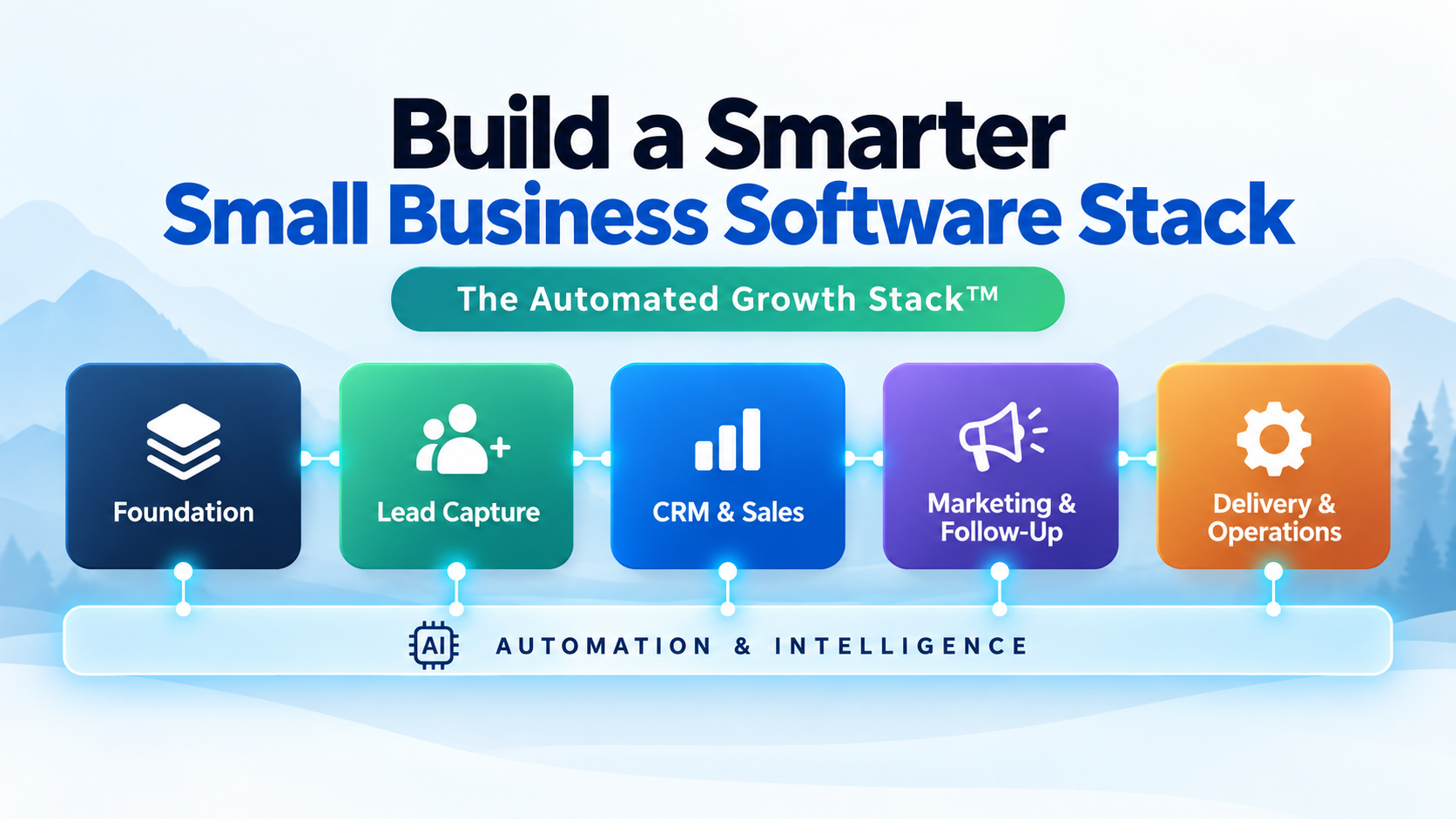
Quick summary: If your business runs on a pile of disconnected software, this guide shows you how to build a small business software stack around six connected components instead of a random collection of tools. You’ll learn what the Automated Growth Stack™ framework covers, what belongs in each component, how to judge whether a tool actually earns its place, and the steps to build or simplify yours without adding unnecessary complexity.
Reading time: about 17 minutes (3,867 words) · Last updated: September 16, 2026
Introduction
Most small business owners did not choose their software stack. It grew.
A scheduling tool got added because clients kept asking for a booking link. A CRM got added because spreadsheets stopped working. An email platform got added for a launch two years ago and never got removed. Somewhere in there, an automation tool got bolted on to connect two systems that should have talked to each other from the start.
None of these decisions were wrong on their own. Each one solved a real problem at the time. The trouble is that nobody ever stepped back and asked whether the pieces added up to a system, or just a pile of subscriptions.
That is the problem this guide solves. By the end, you will understand what a small business software stack actually is, why most of them get complicated without anyone intending it, and how to build or simplify yours using the Automated Growth Stack™, a framework built around six connected components instead of an ever-growing tool list. You will also see example stacks by business type, get a clear way to judge whether a tool belongs in your stack, and walk away with a straightforward set of steps for putting the framework into practice.
The starting principle is simple: build the smallest stack that solves your biggest problem. Everything below supports that one idea.
What Is a Small Business Software Stack?
A software stack is the set of tools a business uses to run itself: the website, the way leads get captured, the system that tracks customer relationships, the tools that handle marketing and follow-up, the systems that deliver the actual work, and whatever automation or AI connects those pieces together.
A solo consultant needs fewer systems than a growing service business with a small team, and that is expected. The number of tools matters less than the relationship between the pieces.
A real stack behaves like a system. The tools talk to each other, information moves through it without being retyped by hand, and each piece has a clear job that does not overlap with another tool doing the same thing. Most small businesses do not have that yet. They have a collection.
Why Small Business Software Stacks Get Complicated
Complexity rarely arrives all at once. It builds up through a series of individually reasonable decisions.
Tools get added to solve one problem at a time. A business owner runs into friction, finds a tool that fixes it, and adopts it. That instinct is sound. The trouble is that nobody usually asks how the new tool fits with everything already in place.
Software also gets sold one product at a time, but a business experiences the combined system. A CRM vendor is not thinking about your email platform. An email platform is not thinking about your scheduling tool. Each product is built to look good on its own, not to fit cleanly into your specific stack. When several vendors each sell in isolation, the business owner becomes the only one responsible for making the pieces work together.
Growth changes what a business needs, too. A stack built for a solo operator handling ten leads a month does not automatically work for a five-person team handling two hundred. As the business grows, old tools often get patched instead of replaced, and the patches accumulate.
Cancellation also feels riskier than adding. It is easy to adopt a new tool when it solves an immediate problem. It is much harder to cancel an old one, because nobody wants to be the person who removed the software that turns out to matter. Subscriptions pile up, half-used and rarely questioned.
The result is a stack that grew instead of one that was designed. That is the gap the Automated Growth Stack™ framework is built to close.
Introducing the Automated Growth Stack™
The Automated Growth Stack™ is the smallest connected set of systems a business needs to attract leads, manage relationships, follow up consistently, deliver its work, and operate efficiently, with automation and AI connecting those systems where they create real value.
The framework has six components:
- Foundation
- Lead Capture
- CRM & Sales
- Marketing & Follow-Up
- Delivery & Operations
- Automation & Intelligence
The first five components represent the actual work of the business: showing up, capturing interest, managing relationships, following up, and delivering the result. Automation & Intelligence is different. It is not a sixth silo sitting next to the other five. It is a connective layer that runs across all of them, moving information between systems and removing repetitive manual work.
That distinction matters. Automation and AI should support the other five components, not dictate them. A business does not need an automation platform in order to have a stack. It needs a stack, and automation lets that stack run with less manual effort.


The sections below walk through each component, what belongs in it, and what to watch for.
1. Foundation
Foundation covers the essential systems everything else in the business depends on. Depending on the business, that can include the website, domain, business email, core business and contact data, payment processing, and file storage. Not every business needs a separate tool for each of these. A small operation might run several of them through one platform, while a larger one keeps them as distinct systems.
Foundation is easy to overlook because it rarely feels exciting. It is also the layer that causes the most damage when neglected, since a broken website, lost business data, or a payment failure undermines every other component built on top of it.
A healthy Foundation is unglamorous by design. It works quietly, stays secure, and does not demand constant attention. If you find yourself thinking about your core systems on a weekly basis, that usually signals something in the Foundation needs attention before you build further on top of it.
2. Lead Capture
Lead Capture is how interest turns into a name, an email address, or a booking. This includes forms, landing pages, scheduling links, and lead magnets.
The job of this component is narrow: turn interest into a contact, inquiry, or booking. It is not supposed to nurture that contact, sell to them, or deliver the work. Those jobs belong to other components. When a business tries to make its Lead Capture tool also handle sales follow-up and project delivery, the tool gets stretched past what it was built for, and the whole system becomes harder to maintain.
A simple, well-placed form or booking link that reliably gets used is more valuable than a sophisticated lead capture system nobody maintains.
3. CRM & Sales
CRM & Sales is where relationships get tracked and moved forward: who the contact is, what stage they are at, what was promised, and what needs to happen next.
This is often the component small businesses adopt latest, usually after a spreadsheet stops being manageable. That delay is common and not necessarily a mistake. A spreadsheet can be a perfectly reasonable CRM for a small number of active relationships. The problem shows up when the business has grown past what a spreadsheet can track reliably, and the owner keeps using one anyway out of habit.
The signal worth watching is not team size. It is whether follow-up is happening consistently. If leads are being forgotten or promises are slipping through the cracks, that is the sign this component needs a real system instead of a workaround.
4. Marketing & Follow-Up
Marketing & Follow-Up covers the ongoing communication that keeps a business in front of leads and customers: email sequences, newsletters, and marketing automation.
This component is where a lot of unnecessary complexity gets introduced, because marketing tools are often sold with dozens of features a small business will never use. The better question is not “what can this tool do,” but “what does my follow-up process actually require.” A welcome sequence, a way to send occasional updates, and a way to segment contacts by interest covers most small business needs. Everything past that should earn its place.
5. Delivery & Operations
Delivery & Operations is how the actual work gets done: onboarding, project management, invoicing, document collection, and whatever operational tools the business depends on.
This component looks different for every business because it reflects what the business actually sells. A service business needs project tracking and client onboarding. A product business needs inventory and fulfillment. What stays consistent is the underlying question: does this tool make it easier to deliver what was promised, or does it just add a step between the promise and the delivery.
6. Automation & Intelligence
Automation & Intelligence is the connective layer, not a separate department. Its job is to move information between the other five components and reduce the manual work of keeping them in sync.
Useful automation in this layer looks like a new lead in Lead Capture automatically creating a contact in CRM & Sales, a completed sale in CRM & Sales triggering the right sequence in Marketing & Follow-Up, and a project status change in Delivery & Operations updating the customer record without anyone touching it by hand.
AI fits into this layer as well, most usefully in tasks like drafting follow-up messages, summarizing customer notes, or flagging where a workflow is breaking down. AI works best here when it amplifies a process that already makes sense. It is not a substitute for one.
How the Six Components Work Together
A stack starts behaving like a stronger system when information can move between components without someone repeatedly retyping it. A lead captured in Lead Capture should show up in the CRM without manual entry. A sale recorded in CRM & Sales should be able to trigger the right sequence in Marketing & Follow-Up. A completed project in Delivery & Operations should update the customer record automatically.
When that connection is missing, the stack still functions, but it depends on the owner or a team member remembering to move information by hand. That dependency is usually where errors and dropped follow-up come from.

This is also why the Automated Growth Stack™ treats Automation & Intelligence as a layer instead of a component in the row. Its entire purpose is making the connections between the other five components work without constant manual effort.
What Doesn’t Belong in Your Stack
Not every useful tool belongs in the stack. A tool earns its place by creating more value than complexity. That value might be time saved, revenue protected, errors reduced, or a better customer experience. Its cost is not just the subscription price. It also includes setup time, training, integration work, and the ongoing attention required to keep it running.
A few signs a tool does not belong:
- It duplicates a job another tool already does.
- Nobody on the team remembers to use it consistently.
- It was purchased for a specific launch or project that already ended.
- It requires more manual maintenance than the problem it solves.
- It cannot connect to the rest of the stack without constant manual work.
Here is a useful question to ask about every tool in your current stack, one at a time: if you were starting from scratch today, would you choose to add this tool back in? If the honest answer is no, it is a candidate for removal.
How Many Tools Should a Small Business Stack Have?
There is no fixed number, and any guide that hands you one is oversimplifying. The right size for your stack depends on business type, team size, and how much of the work repeats often enough to be worth systematizing.
Instead of counting tools, ask better questions about the ones you already have:
- Does every tool solve a clear problem?
- Does each tool have a defined role, one that does not overlap with another tool’s job?
- Is functionality unnecessarily duplicated somewhere in the stack?
- Does important information move between systems the way it should, or does someone have to move it by hand?
- Is the tool actually used, or has it quietly stopped being part of the daily workflow?
- Does the value it creates justify its financial and maintenance cost?
- Could a tool you already have handle this job instead of adding a new one?
The goal is not the fewest possible tools. It is the fewest tools required to run the business well.
How to Build Your Stack: Implementation Steps
Building or simplifying a stack works best as a sequence, not a single overhaul.
Step 1: Document what you have. Before changing anything, write down every tool currently in use and which of the six components it belongs to. Do not automate or cancel anything yet. The goal at this stage is simply to see the current system clearly.
Step 2: Apply the Tool Overload Test™. Once the current stack is visible, go through it and identify duplicate tools, unused subscriptions, and genuine gaps. The goal of this step is a clean software stack, not a bigger one.
Step 3: Fill real gaps, one component at a time. Add tools only where a genuine gap exists, starting with whichever component is causing the most friction right now. Resist the urge to fill every component at once.
Step 4: Connect the pieces. Once each component has the right tool, focus on the connections between them. This is where the Automation & Intelligence layer starts to matter, even in a simple form like automated notifications or basic triggers.
Step 5: Review and revisit. After a few weeks of use, revisit the stack and remove anything that is not earning its place. A healthy stack becomes more intentional over time. Growth may require more capability, but every additional tool should have a defined role and create more value than complexity.
Implement This Today
- Difficulty: Low to moderate, depending on how many tools are already in place
- Time Required: Two to four hours for the initial documentation and audit
- Cost: No new software required for the first two steps
- First Action: List every tool currently in use next to the stack component it belongs to
For a longer, structured version of this process spread across a full quarter, see the 90-Day Automation Plan™.
Example Stacks by Business Type
These examples show software categories, not specific product recommendations. For help choosing an actual product within a category, see AGL’s best CRM for small business and best email marketing software guides.
Solo service provider (consultant, coach, freelancer)
- Foundation: website, business email
- Lead Capture: a single landing page and a scheduling link
- CRM & Sales: a lightweight CRM or a well-maintained spreadsheet, depending on volume
- Marketing & Follow-Up: a simple email platform with one welcome sequence
- Delivery & Operations: an invoicing tool and a basic project tracker
- Automation & Intelligence: a handful of connected triggers linking the scheduling tool to the CRM, and the CRM to the email platform
Small team service business (agency, local business with staff)
- Foundation: website, business email, shared file storage
- Lead Capture: multiple landing pages and forms by service line
- CRM & Sales: a full CRM with pipeline stages and team visibility
- Marketing & Follow-Up: a marketing automation platform with segmented sequences
- Delivery & Operations: project management software, client onboarding checklists, invoicing
- Automation & Intelligence: connected workflows across intake, CRM, onboarding, and invoicing, plus AI-assisted drafting for routine communication
Neither example is a template to copy exactly. They are illustrations of how the same six components scale differently depending on the business.
The Role of AI and Automation in the Stack
AI and automation belong in the Automation & Intelligence layer, not scattered as standalone tools across the other five components.
The most useful automation in a small business stack is often the least exciting: a new contact created automatically instead of by hand, a follow-up email sent on schedule instead of when someone remembers, a status update pushed to the right place instead of typed twice.
AI adds the most value on top of that foundation, in tasks like drafting a first version of a follow-up message, summarizing a call or a set of notes, or flagging where a workflow seems to be breaking down. AI does not replace the judgment behind the stack. It reduces the manual effort required to run it.
To estimate whether a specific automation is worth adding, the Automation ROI Calculator™ compares the time an automation saves against the cost of the tool that runs it.
Signs Your Stack Has Gotten Too Complex
A few patterns tend to show up once a stack has outgrown what it needs to be:
- You are paying for software you or your team rarely open.
- The same piece of information gets typed into more than one system by hand.
- Onboarding a new team member takes longer because of the sheer number of tools involved.
- Nobody can explain, without checking, what a specific tool is actually for.
- Two or more tools do essentially the same job.
None of these signs mean the business made bad decisions. They mean it is time to run the Tool Overload Test™ again and simplify.
How the Automated Growth Stack™ Fits Into the Automated Growth Roadmap™
The Automated Growth Stack™ and the Automated Growth Roadmap™ answer two different questions.
The Stack answers which systems make up the business and how they connect. It is the map of Foundation, Lead Capture, CRM & Sales, Marketing & Follow-Up, Delivery & Operations, and Automation & Intelligence, and the relationships between them.
The Roadmap answers what to improve next and in what order. It is the planning layer that helps a business decide which part of the Stack deserves attention before buying, replacing, or automating anything.
The two work together rather than in sequence. You do not need to finish building a complete Stack before the Roadmap becomes useful. In practice, the Roadmap often points back at the Stack, identifying which specific component is the highest-value place to focus next, whether that means filling a real gap, connecting two systems that are not talking to each other, or removing something that no longer earns its place.
When to Use This Framework (and When Not to Rebuild Your Stack)
Use the Automated Growth Stack™ framework when:
- You are starting a business and choosing software for the first time.
- Your current stack feels disconnected, and you are not sure what to add or remove.
- You are growing and unsure whether your existing tools will scale with you.
You probably do not need to rebuild your stack when:
- Your current tools are working, connected, and nobody is describing them as frustrating.
- The friction you are feeling is a process problem, not a software problem. Adding a new tool will not fix a workflow that was never clearly defined.
- You just finished a stack review in the last few months and nothing significant has changed.
A stack that works does not need to be rebuilt just because a new tool exists. Revisit it when growth, friction, or a genuine gap makes that necessary, not on a fixed schedule for its own sake.
Frequently Asked Questions
What is a small business software stack? A small business software stack is the connected set of tools a business uses to attract leads, manage customer relationships, follow up, deliver its work, and automate the repetitive parts of running the business.
How many tools should be in a small business software stack? There is no fixed number. The better test is whether each tool solves a clear problem, has a defined role, and creates more value than it costs to run. A stack built around the right tools for the job is healthier than one aiming for a specific count.
What is the Automated Growth Stack™? The Automated Growth Stack™ is AGL’s framework for building the smallest connected set of systems a business needs, organized into six components: Foundation, Lead Capture, CRM & Sales, Marketing & Follow-Up, Delivery & Operations, and Automation & Intelligence.
Do I need automation software to have a good stack? No. Automation supports the Stack, but Automation & Intelligence is a connective layer across the other five components. A business can have a functional stack without dedicated automation software and add more automation when the underlying processes are ready.
How do I know if my current stack is too complicated? Common signs include paying for tools you rarely use, retyping the same information into multiple systems, and being unable to explain what a specific tool is for without checking.
Should I choose software before or after mapping out my stack? After. Choosing a software category based on a clear gap in your stack works better than adopting a tool first and figuring out where it fits later.
Next Step
You do not need to rebuild your entire stack this week. Start with Step 1: write down every tool you currently use and which of the six components it belongs to. That single list will tell you more about where your stack actually stands than any product review will.
If you want help identifying which parts of your business are worth automating first, download the Automated Growth Blueprint, which walks through how to find your highest-value automation opportunities before you add new software.
Related reading
Leave a Reply