

Automated Growth Lab may earn a commission from some links in this article, at no additional cost to you. We only recommend tools we believe genuinely fit the reader and use case.
Quick Summary
Best for: Small businesses that need email, lead capture, landing pages, and behavior-based automation in one system.
Avoid it if: You mainly send newsletters, need a true sales CRM, or want advanced automation without paying for the Marketer plan.
Bottom line: GetResponse is a strong all-in-one email and automation platform. Its best capability is gated behind Marketer, not the advertised Starter price, and the interface takes time to learn.
Testing status: Hands-on testing on the Marketer plan, August 24 to 27, 2026. We tested campaigns, automation, AI tools, WordPress integration, contact exports, segments, and reporting. We did not test deliverability or high-volume performance.
Reading time: Approximately 14 minutes.
Last updated: September 7, 2026
Introduction
Most small businesses don’t start out looking for GetResponse. They start out losing track of leads. A prospect downloads a guide and hears nothing for two weeks. A customer buys once and never gets a second message. Everyone agrees follow-up matters, and almost nobody does it consistently by hand.
This GetResponse review answers a more useful question than simply whether GetResponse is good software: is it the right system for the way your small business actually follows up with leads? GetResponse bundles email marketing, forms, landing pages, and behavior-based automation into one subscription, and it markets itself as a replacement for several separate tools. That promise is only worth what you’ll actually use.
We spent four days testing GetResponse’s Marketer plan against a realistic small-business workflow: tagging a new lead, branching on engagement, triggering an action on a high-intent click, and routing quiet contacts toward re-engagement. We paired that hands-on testing with GetResponse’s official documentation and pricing pages to answer the questions that matter before you commit to a year of software: which plan actually delivers the automation you’re picturing, what it will really cost as your list grows, and which kind of business should look elsewhere entirely.
Quick Verdict
GetResponse is a capable all-in-one growth platform with genuinely useful automation. In hands-on testing, it tagged leads, branched on engagement, reacted to a high-intent click, and routed quiet contacts toward re-engagement. Its AI Campaign Generator also produced a coordinated landing page, autoresponder, and newsletter in one pass, saving meaningful setup time.
The important caveat is the plan gate. Tagging, scoring, and the behavior-based automation most buyers picture require Marketer, not the entry-level Starter plan. Starter allows one custom workflow and lacks the contact controls needed for the full system we tested.
This review scores Marketer at 1,000 contacts, priced at $48.38 per month with annual billing. That is fair value if you will use email, forms, landing pages, and automation together. It is too much platform for a simple newsletter.
Recommendation: Recommended With Caveats.
Automated Growth Score™: GetResponse

⭐ Automated Growth Score™: 8.0 / 10
Calculated using Automated Growth Lab’s Automated Growth Score™ framework. Overall reflects the intended reader, the scored configuration, current evidence, cost, implementation burden, and available alternatives. It is not a mechanical average of the category scores below.
Scored configuration: Marketer, 1,000 contacts, annual billing. The intended user is a small business that wants email, lead capture, and behavior-based automation in one system.
| Category | Score | Why it earned the score |
|---|---|---|
| Beginner Friendly | 7.0 | Lists, imports, field mapping, and campaign sending worked. However, related tasks are spread across several modules, so a first-time user must learn GetResponse’s internal structure. |
| AI Features | 8.5 | The AI Campaign Generator created three coordinated, editable assets and saved meaningful first-draft time. The copy and imagery were generic and required substantial brand, proof, offer, and design work. |
| Automation Power | 8.8 | Marketer handled tags, scores, branches, tracked clicks, segments, and re-engagement logic. Setup friction, a 30-minute click-evaluation window, and WordPress identity complexity kept it below exceptional. |
| Ease of Use | 7.0 | Individual builders were understandable, and contact activity helped diagnose problems. The overall experience was fragmented, some controls were hard to find, and several steps required experimentation. |
| Integrations | 8.3 | The official WordPress plugin and Web Connect worked, while 170-plus integrations, an API, and contact import/export provide broad stack fit. Exports omit behavioral history, and web automation may require a separate identity event. |
| Value for Money | 8.6 | At $48.38 per month annually, Marketer can replace separate email, landing-page, form, popup, and basic automation tools. Stepped contact pricing and non-refundable billing reduce the value. |
| Overall | 8.0 | Strong automation and practical consolidation value, balanced by the Marketer plan gate and a real learning curve. |
The number and the recommendation answer different questions. An 8.0 means GetResponse is strong with manageable trade-offs. Recommended With Caveats reflects who should act: businesses that need the integrated workflow, not everyone shopping for email software.
Who GetResponse Is Best For
- Consultants and service businesses that capture leads on a website and want follow-up to change based on engagement.
- Small teams that will use email, forms, landing pages, and automation together.
- Ecommerce businesses that need abandoned-cart, purchase, or browsing triggers on Marketer or above.
- Creators and educators who will genuinely use Creator’s webinar or course tools.
- Permission-based affiliate marketers building nurture sequences from an opted-in list.
Who Should Look Elsewhere
- Newsletter-only senders. A simpler tool such as MailerLite will be easier and usually cheaper.
- Sales-led teams that need a pipeline. GetResponse manages contacts and engagement, not deals through sales stages.
- Businesses already happy with dedicated funnel, webinar, or course tools. GetResponse’s breadth creates duplicate cost rather than consolidation.
- Teams that need the deepest specialist automation. Compare ActiveCampaign directly.
- Businesses unwilling to maintain list hygiene. GetResponse’s contact-counting rules punish duplicate lists and repeated additions.
What Is GetResponse, and What Problem Does It Solve?
GetResponse began as an email marketing platform and expanded into a broader lead-capture and follow-up system. It combines campaigns, autoresponders, landing pages, signup forms, popups, and visual automation. Higher plans add ecommerce, webinars, courses, and other tools.
The business problem is usually not sending email. It is inconsistent follow-up. Someone downloads a guide and hears nothing for weeks. A prospect clicks a pricing link but receives the same message as everyone else. A past customer disappears because nobody owns the next contact.
A newsletter tool delivers messages to a list. GetResponse can capture the lead, label or score what they do, and change the next step based on their behavior. That broader loop is the reason to consider it. If you do not need that loop, its extra machinery is a disadvantage.
GetResponse’s Most Important Features
Email Campaigns and Autoresponders
Paid plans include unlimited email sends. GetResponse supports newsletters, fixed autoresponder sequences, and messages sent from automation workflows. In testing, campaigns sent successfully and contact records showed sent, opened, and clicked events with timestamps. That detail later helped us diagnose the WordPress workflow.
Starter can handle newsletters and linear follow-up. Marketer is where email becomes behavior-based: it adds the tagging, scoring, and workflow depth needed to treat engaged and inactive contacts differently.
If you are still planning your first workflow, our email automation for small business guide shows the complete system to map before building it inside GetResponse.
Landing Pages, Forms, and Popups
Landing pages and popups are unlimited on paid plans, with unlimited visitors. These tools matter when they replace a separate page or form subscription. They add little value when you already have a system you plan to keep.
Segments, Tags, and Scores
Tags record meaningful actions, scores identify warmer contacts, and segments group people dynamically. All three worked in testing. A workflow-applied tag persisted on the contact, appeared in the CSV export, and could define a newsletter segment.
The capability was stronger than the navigation. Segment creation lives in its own area rather than appearing as a save option on the contact search we used. We found it, but not where expected.
Funnels, Ecommerce, Webinars, and Courses
Ecommerce tracking and purchase-based automation are available on Marketer and above. Webinars and courses require Creator.
Apply the Tool Overload Test™ before paying for these extras. If a feature will not replace another subscription or support a real plan, it is not value. It is more interface to maintain.
How Easy Is GetResponse to Set Up and Use?
Core setup worked. We created a list, imported a small permission-based CSV, mapped standard and custom fields, and sent a campaign without a blocking problem. An export later confirmed that names, email addresses, company data, and custom fields survived the process.
The friction is structural. One complete campaign required moving among Lists and Contacts, Newsletters, Autoresponders, Automation, and AI Campaigns. Each area is understandable on its own. Together they require a mental model of how GetResponse organizes work.
An experienced marketer should adjust. A beginner may need experimentation and a written setup checklist. We are not publishing a time-to-first-campaign estimate because the account had prior domain configuration and the test was not stopwatch-timed.

GetResponse Automation: The Reason to Buy
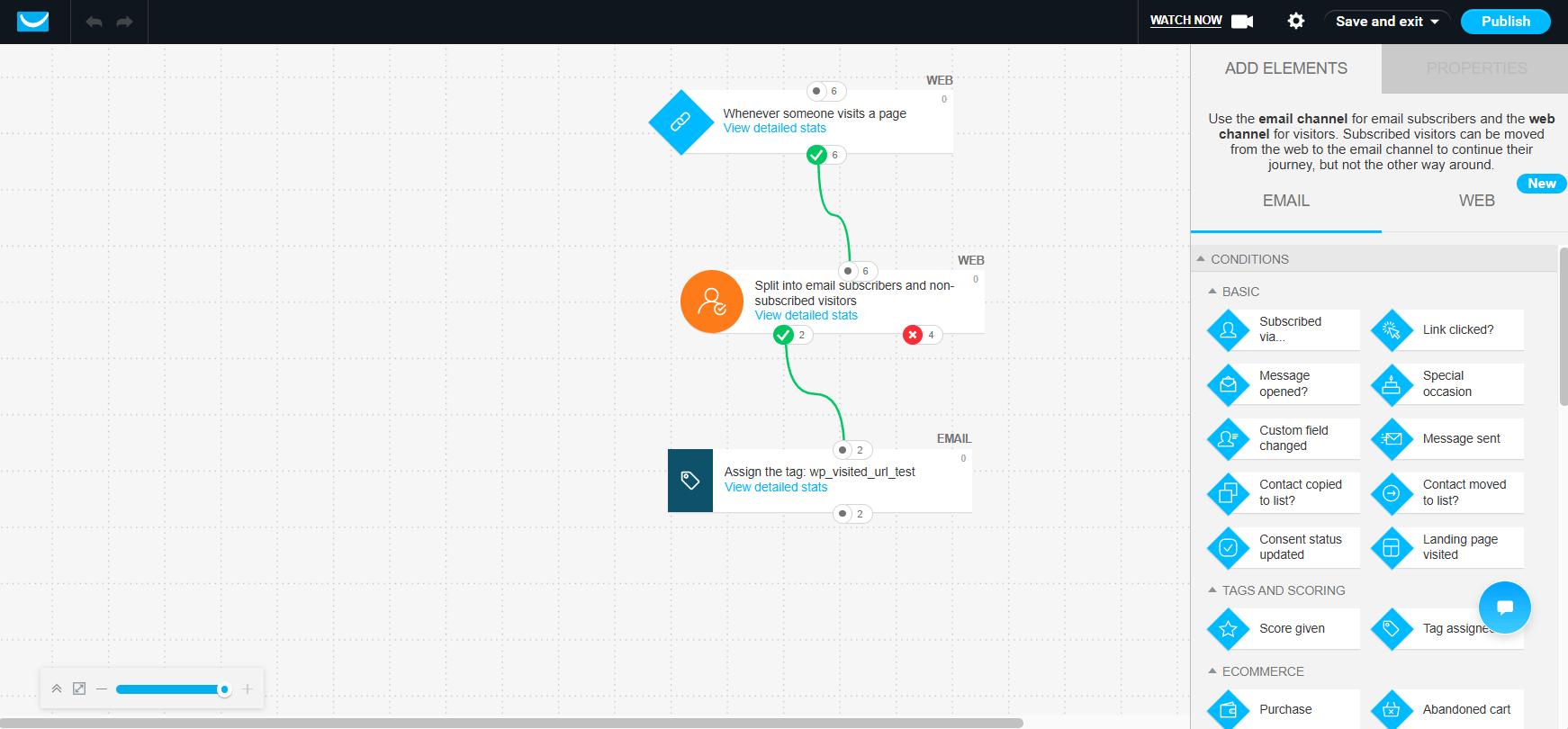
We tested a realistic small-business workflow on Marketer:
- A new lead enters the system and receives a tag.
- A welcome sequence begins.
- Engaged and inactive contacts split into different branches.
- A high-intent action, a tracked link click in our test, adds score and advances the contact.
- Quiet contacts enter a re-engagement path.
The workflow worked. The builder supported entry conditions, branching, waits, tags, scores, and downstream actions without a workaround. Available triggers and conditions cover subscriptions, opens, clicks, tags, scores, field changes, landing-page visits, purchases, abandoned carts, visited URLs, and events.
Two limits matter. First, the link-click condition enforces a minimum 30-minute evaluation window. That is reasonable in production but slows testing. Second, we did not establish Marketer’s active-workflow ceiling or confirm identical repeat-entry behavior across every condition type. If your plan depends on many concurrent workflows, confirm the current limit before buying.
The platform’s constraint is not a lack of automation power. It is the plan and setup effort required to use it.
Are GetResponse’s AI Features Useful?
Yes, as a starting-point accelerator.
The AI Campaign Generator produced a coordinated landing page, autoresponder, and newsletter through one setup flow. The shared palette and structure saved meaningful time compared with starting each asset from blank, and everything remained editable.
It did not produce a finished campaign. The copy was generic, the imagery was stock-like, and several sections needed real brand voice, proof, offer details, and design work. The subject-line generator followed the same pattern: useful options, not a substitute for judgment.
AI generation is unlimited on Marketer and limited to three uses on Starter. Active Intelligence, Campaign-Builder Assistant, and Brand-Kit Import appeared in recent marketing but were not available in the tested Marketer account. Support directed us to the AI Campaign Generator instead. Do not buy expecting those unavailable features.
We also did not verify GetResponse’s claim of an 85% reduction in email creation time, so this review does not repeat it as a result.
GetResponse Integrations and the WordPress Identity Caveat
GetResponse lists more than 170 native integrations, an open API, and import and export on every plan. The official WordPress plugin connected successfully to automatedgrowthlab.com, and Web Connect recorded site activity.
However, a visited-URL workflow did not reliably tag a subscriber who arrived through a site form. GetResponse could record the browser visit without consistently connecting it to the known contact.
The missing step was an identity event. We sent a newsletter to a controlled segment with click tracking enabled. After the contact clicked the tracked GetResponse link, the browser and subscriber were associated and the workflow applied its tag.
Recording an anonymous visit and acting on it for a known subscriber are different jobs. Contact-level web automation may require an identification event and more setup than the interface suggests. This distinction should be part of your implementation plan if visited-URL triggers matter.
The initial WordPress administrator contact also did not appear immediately in the target list. We did not test synchronization exhaustively, so do not assume every existing contact imports instantly.
Data Portability
The contact export contained 45 columns, including contact and custom fields, tags, scores, signup details, origin, and geography. That is solid basic portability.
It is not a complete behavioral or compliance archive. The export omitted message opens and clicks, message history, workflow history, exact consent language, and a separate double-opt-in confirmation timestamp. Plan separately if you need those records.

GetResponse Pricing: What Will It Really Cost?
Pricing checked September 7, 2026. Prices shown are for 1,000 contacts and may change as your list grows.
Pricing at 1,000 Contacts
| Plan | Monthly billing | Annual billing, per month | Practical fit |
|---|---|---|---|
| Free | $0 | $0 | Testing during and after the 14-day premium window |
| Starter | $19.00 | $15.58 | Newsletters and linear autoresponders |
| Marketer | $59.00 | $48.38 | Scored plan. Behavior-based automation |
| Creator | $69.00 | $56.58 | Webinars, courses, and website tools |
| Enterprise | Custom | Custom | High-volume and enterprise requirements |
Annual billing is 18% below monthly. A separate 10% Get Started Checklist discount stacks sequentially, making the combined reduction 26.2%, not 28%. Support said the checklist discount lasts 12 months, is single-use, and can be lost after a plan change, pause, or cancellation.
Marketer Growth Pricing
| Contacts | Monthly billing | Annual billing, per month | Annual total |
|---|---|---|---|
| 1,000 | $59.00 | $48.38 | $580.56 |
| 2,500 | $69.00 | $56.58 | $678.96 |
| 5,000 | $95.00 | $77.90 | $934.80 |
| 10,000 | $114.00 | $93.48 | $1,121.76 |
The scored configuration costs $580.56 for the first year on standard annual billing, compared with $708 paid monthly. An eligible checklist discount would lower that first year to about $522.50, but treat that as conditional rather than the baseline.
Growing from 1,000 to 5,000 contacts adds $354.24 per year, about 61% for a fivefold list increase. Pricing steps at tier boundaries rather than rising one contact at a time.
Free Plan and Billing Risks
New free accounts receive premium features for 14 days, then continue with reduced features. The ongoing free allowance includes up to 2,500 messages per month, counted across newsletters, autoresponders, and automation messages, with notification emails such as confirmations excluded. Contacts above the applicable ceiling wait in a queue, and a paid account cannot later downgrade to Free. The ongoing Free account currently supports up to 500 contacts. Contacts above that limit move to a queue until you upgrade or make room.
Paid subscriptions are non-refundable. Annual billing saves $127.44 at the scored tier, but it also commits the money for twelve months. If fit is uncertain, paying monthly first buys a real exit option.
The Contact-Counting Rule Most Buyers Miss
GetResponse uses both the peak active-contact count during a billing month and the total contacts added during that month. Deleting and re-adding people does not necessarily keep the account in a lower tier.
Duplicates across lists also count separately. The same email stored on three lists counts three times. The practical rule is simple: keep one list and use segments within it. Segments organize contacts without creating billable duplicates.
If you exceed the tier, GetResponse charges the difference to the next level for that billing cycle. The charge can apply even on an annual plan and can repeat until the account returns below the limit.
GetResponse Pros and Cons
Strengths
- Strong behavior-based automation that worked in realistic testing.
- Unlimited email sends, landing pages, and popups on paid plans.
- Useful AI acceleration for coordinated first drafts.
- Five users included on Marketer.
- Broad integrations, an API, an official WordPress plugin, and contact export.
Limitations
- The automation most buyers want requires Marketer, not the headline Starter price.
- The interface is fragmented across modules.
- Web automation for known contacts may require an identification event.
- Exports omit engagement, workflow, and detailed consent history.
- AI output requires substantial editing.
- Annual subscriptions are non-refundable.
- GetResponse is not a sales CRM.
GetResponse Alternatives
The alternatives below match the positioning in AGL’s current Best Email Marketing Software for Small Business guide.
| Alternative | Choose it when |
|---|---|
| ActiveCampaign | Advanced automation depth matters more than simplicity or all-in-one breadth. |
| Brevo | Send-based pricing fits your list better, or transactional email is central. |
| MailerLite | You want a simpler, lower-cost newsletter and landing-page tool. |
| Kit | You are a creator focused on audience growth and monetization. |
| HubSpot | CRM, sales, and marketing need to operate from one customer record. |
AGL’s Best Marketing Automation Software for Small Business guide compares GetResponse directly against six other platforms and names it Best Overall for the typical small-business reader, based on hands-on workflow testing in GetResponse, ActiveCampaign, and Brevo, plus documented research on the rest. ActiveCampaign holds Best for Advanced Automation in that same comparison.
A comparative award and a caveated individual recommendation are not in conflict. The buying guide measures comparative balance across seven platforms for the typical small-business reader, while this review asks whether an individual buyer should purchase GetResponse Marketer after seeing its plan gate, learning curve, pricing rules, and limitations. A platform can win Best Overall because it offers the strongest balance for the typical small business, while another platform wins a specialist category such as advanced automation. That does not mean GetResponse is the right purchase for every reader, which is why this review remains Recommended With Caveats.
GetResponse Recommendation Matrix
| If this describes you | Recommendation |
|---|---|
| You need email, lead capture, landing pages, and behavior-based automation together | GetResponse Marketer is a strong fit |
| You mainly send newsletters and a basic welcome sequence | Choose a simpler, lower-cost platform |
| You will genuinely use webinars or courses | Compare Creator’s total cost with your current tools |
| You need a sales pipeline | Choose a CRM-led platform |
| You want the deepest specialist automation | Compare GetResponse with ActiveCampaign |
| You are uncertain about fit | Use the free account, then test Marketer monthly before paying annually |
Final Verdict: Is GetResponse Worth It?
Yes, for a small business that will use email, lead capture, landing pages, and automation together on Marketer.
The automation is the reason to choose it. We built a real workflow with tags, scores, engagement branches, a high-intent action, and re-engagement logic, and it worked. Unlimited sends, included lead-capture tools, useful AI scaffolding, and five Marketer users make $580.56 a year defensible when those capabilities replace other tools.
The reason to choose something else is just as clear. If you mainly want newsletters, GetResponse is more platform than you need. Its advertised entry price does not include the system tested here, the learning curve is real, and annual payments are non-refundable.
Start with the workflow, not the software. If the behavior-based sequence in this review matches your next business need, build one small version in the free account and test Marketer monthly before committing annually. If it does not, use the Best Email Marketing Software for Small Business guide to choose a better fit.
Not sure which workflow deserves attention first? The AI Business Automation Blueprint helps identify the highest-return opportunities before you buy software.
Frequently Asked Questions
It is approachable, but it is not the simplest option. Core tasks worked in testing, while the platform’s module structure created a learning curve. Beginners who only need newsletters should choose a more focused tool.
Yes. New accounts receive premium features for 14 days, then continue with reduced features. The ongoing Free account currently supports up to 500 contacts and up to 2,500 messages per month. A paid account cannot later downgrade to Free.
Starter begins at $15.58 per month with annual billing at 1,000 contacts. Marketer, the plan scored in this review, costs $48.38 per month annually or $580.56 for the year. Costs rise at contact thresholds.
Yes, and it is the platform’s strongest feature. However, meaningful behavior-based automation requires Marketer or above. Starter allows one custom workflow and lacks tagging and scoring.
No. It manages contacts, tags, scores, and engagement history but does not provide sales pipeline management.
The platform suits it well. Unlimited sends, behavior-based nurture sequences, tagging, and landing pages cover what most affiliate marketers need, and affiliate promotion is permitted.
The constraint is how you build the list, not what you send. GetResponse prohibits rented, purchased, and scraped or harvested addresses, and requires express consent that cannot be presumed or inferred. It also reserves the right to verify imported lists for quality and spam traps, and to reject an import on a negative result. Confirmed opt-in is recommended rather than required.
If your plan depends on buying a list, this is the wrong platform, and that is true of every reputable provider. Permission, list hygiene, and content remain your responsibility.
For a basic opt-in page or lead-magnet funnel, often yes. Landing pages, forms, and popups are unlimited on every paid plan, and we built and tested a working signup path on Marketer without hitting a wall.
We did not directly test GetResponse’s dedicated Conversion Funnel or ecommerce funnel tools. If you need advanced funnel analytics, order bumps, or multi-step upsell sequencing, compare those specific tools against a dedicated funnel platform before assuming GetResponse’s version matches it feature for feature.
Choose ActiveCampaign for deeper automation, MailerLite for simplicity and cost, Brevo for send-based pricing, Kit for creator workflows, or HubSpot when CRM is central.