
Quick Summary
This 90-day automation plan helps small business owners improve one costly workflow at a time.
Who this is for: Small business owners who know one workflow is costing them time or customers, have limited hours to fix it, and would rather improve what they already own than buy a collection of new tools.
What you can reasonably accomplish: In about 12 weeks, you can choose one bottleneck, measure where it stands today, simplify the process, automate the steps that are genuinely repetitive, and see whether the result beats your starting point. You will not automate your whole business in 90 days, and you should not try.
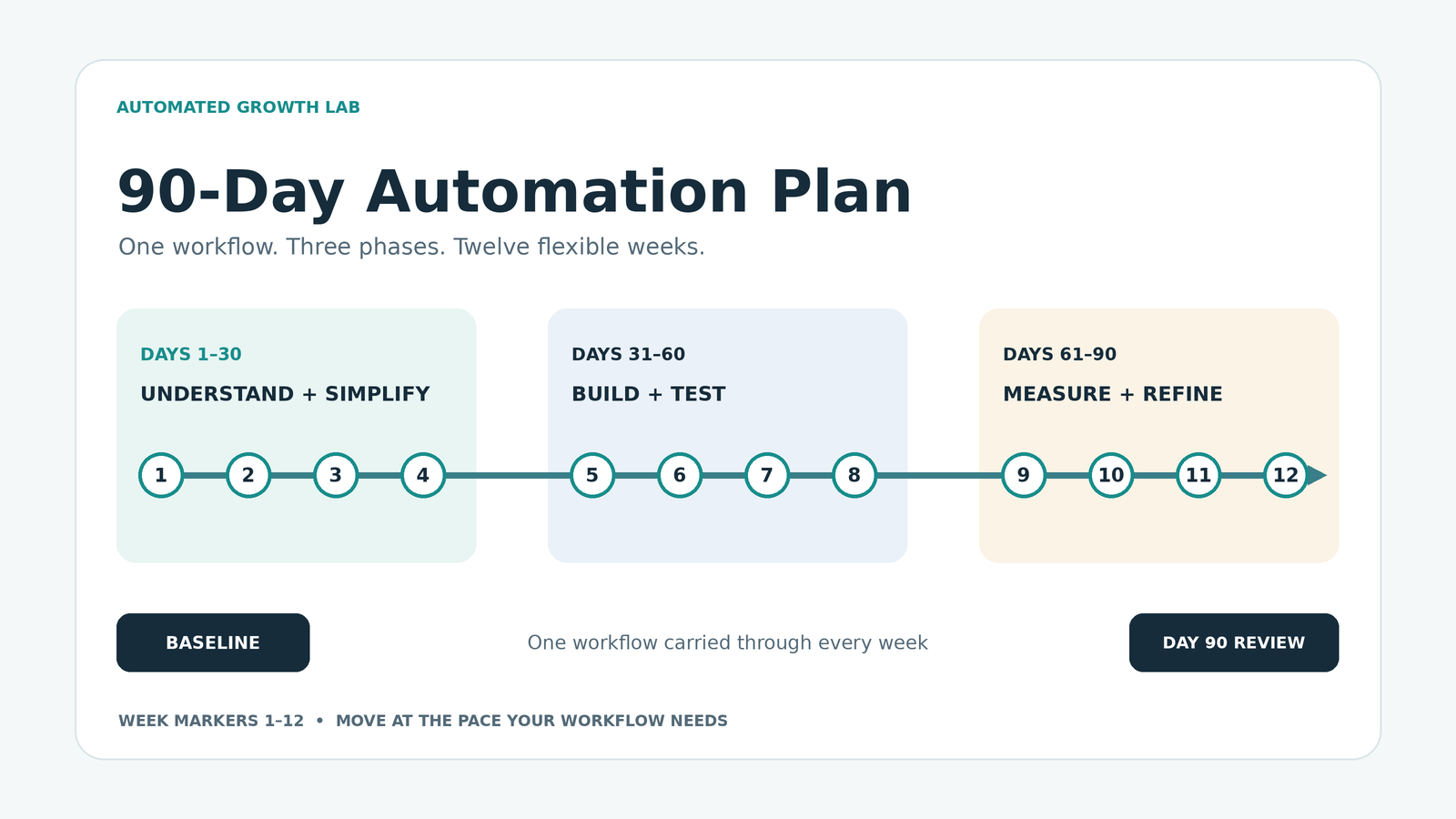
How to use the schedule: The plan runs in three 30-day phases: understand and simplify, build the working system, then measure and refine. Each week has one main task, one deliverable, and one checkpoint. Treat the weeks as a suggested pace, not a deadline. If a step takes longer, finish it before moving on.
Reading time: About 18 minutes
Why Most Small Business Automation Projects Stall
Here is a pattern many owners will recognize. In the same month, you sign up for a scheduling tool, turn on an email sequence, connect your website form to a CRM, and start using an AI assistant to draft replies. A few weeks later the business feels busier, not calmer. Leads still slip through, and nobody can say which change helped.
The software is rarely the real problem. Too many things changed at once, nobody measured the starting point, and no single person owned the result. When something improves, you cannot tell why. When something breaks, you cannot tell what to undo.
This 90-day automation plan for small business owners takes the opposite approach. You fix one workflow, measure it before and after, and add automation only where the process is already clear. It is Automated Growth Lab’s 90-Day Automation Plan™, and it follows the principle behind all of our guidance: build the smallest stack that solves your biggest problem.
Where This Plan Fits With Our Other Frameworks
Three AGL frameworks appear in this guide, and each has a different job:
- The Automated Growth Roadmap™ sets the decision order. Its seven steps help you decide what to fix and in what sequence. This plan does not repeat that material; it gives you a 12-week schedule for applying it to one workflow.
- The Automated Growth Stack™ describes the systems a small business runs on. Use it to see which part of your business your bottleneck lives in.
- The Tool Overload Test™ helps you judge whether the software you already have, or are thinking of buying, deserves a place in that system.
If you want wider context on what to automate first, our guide on how to automate a small business covers the broader sequence.
Before Day 1: Choose One Bottleneck, One Owner, and One Baseline
The preparation step takes the least time and matters the most. Skip it, and you end up with a busier business and no way to prove anything improved.
Pick the Bottleneck That Costs You Most Right Now
A bottleneck is the point where work regularly slows down, gets forgotten, or needs to be redone. Common examples include web leads waiting days for a reply, new customers asking what happens next, invoices that need chasing, and information retyped from one system into another.
Choose the one where delays or errors cost the most today, whether that cost is lost revenue, a poor customer experience, or your own hours. It might be sales follow-up, customer onboarding, invoicing, or scheduling. There is no rule that marketing should come before sales or operations. The right starting point is wherever your business is actually leaking.
Once you have chosen the bottleneck, use the Automation Opportunity Matrix™ to compare the specific tasks you could automate within it. The matrix helps you choose one manageable pilot and identify any preparation needed before building.
If two options feel equal, pick the one that happens more often. A workflow that runs every day gives you more data and faster feedback than one that runs once a month.

Name One Owner
The owner is the person responsible for making the workflow work. They do not have to perform every step, but they notice when it breaks and have the authority to change it.
In a solo business, that is you. In a small team, choose the person closest to the work, and write down one name rather than “the team.” Shared ownership usually means nobody checks.
Record a Baseline
A baseline is a simple measurement of how the workflow performs before you change anything. Choose a measure that fits the problem:
- Response time: how long an inquiry waits for a first reply.
- Hours spent: how much time the workflow takes each week.
- Missed follow-ups: how many contacts never get a second touch.
- Errors or rework: how often something has to be fixed or redone.
- Completion: how many requests, bookings, or onboardings reach the finish.
Measure over one to two typical weeks if you can. A notebook tally or a simple spreadsheet is fine. What matters is that you can measure the same way again at day 90.
Then write the baseline as one plain sentence, such as: “Web leads currently wait about [X] hours for a first reply, and about [Y] out of every 10 never receive a second follow-up.”
Days 1–30: Understand and Simplify the Workflow
The first month is about seeing the workflow clearly and making it simpler before you automate any of it. Automation does not repair a broken process. It makes the broken process run faster.
Week 1: Document the Workflow as It Actually Runs
Take one recent, real example and trace it from start to finish. Write down every step, who performed it, which tool was used, and how long each gap between steps lasted.
Record what actually happens, not what is supposed to happen. The unofficial workarounds, like forwarding an email to yourself as a reminder, are often where the real problems hide. A numbered list or a row of sticky notes works as well as any diagram.
Week 2: Find the Handoffs and Exceptions
Next, mark every handoff: each point where the work passes from one person to another or from one tool to another. Many workflow failures happen at these points, because each side assumes the other has it covered.
After that, list the exceptions. These are the cases that do not follow the normal path, such as after-hours requests, duplicate submissions, customers outside your service area, or urgent jobs. For each one, note how it is handled today. If the honest answer is “whoever notices,” that is useful information.
Week 3: Assess Your Tools and Fix the Process
List every tool this workflow touches. Then run each one through the Tool Overload Test™, which asks five questions:
- What exact job does it do?
- Is it actually being used?
- Does another tool already do the job well enough?
- Does it fit the rest of your system?
- Is the value greater than the full cost?
Each tool ends with one of five outcomes: Keep, Improve, Consolidate, Replace, or Cancel. For this plan, you only need to assess the tools connected to your chosen bottleneck.
With the tool picture clear, rewrite the process. Remove steps that exist only because two tools do not connect, reduce unnecessary handoffs, and decide a standard response for each exception. The revised process should make sense on paper before any new automation is involved.
Week 4: Make One Modest Improvement and Check That It Works
Choose one change that is small, easy to reverse, and clearly tied to the bottleneck. Sending all form submissions to one shared inbox, adding an automatic acknowledgment message, writing a standard reply template, or offering a booking link are all reasonable first moves.
Test it with several real or test cases before relying on it. Then glance at your measure against the baseline. One week of data is not proof, but it can reveal whether the change is heading in the right direction or causing a new problem.
Days 31–60: Build the Working System
In the second month, you build the complete path for your chosen bottleneck. That might mean follow-up, routing, reminders, or onboarding steps, depending on the workflow. For a lead follow-up problem, you are usually working in the CRM & Sales and Marketing & Follow-Up components of the Automated Growth Stack™. For an onboarding problem, you are more likely working in Delivery & Operations.
Week 5: Design the System Before You Build It
Write each step in four parts: the trigger, the action, the owner, and the timing. For example: “When a web form is submitted (trigger), create a contact record and send a confirmation (action), assigned to the office manager (owner), immediately (timing).”
This written design becomes your build checklist. It also exposes gaps early, such as a step with no owner or a reminder with no clear deadline.
Week 6: Build With the Software You Already Have
Start with the tools you already pay for. They may include automation features you have not turned on yet, and using them avoids new costs, new logins, and another integration to maintain.
Add new software only when your Week 3 assessment shows a real gap and the value clearly exceeds the full cost. If you have no system for tracking contacts at all, our guide to the best CRM for small business explains how to choose one without overbuying. If your existing tool includes AI drafting, it can help prepare routine replies, but a person should review anything sent to a customer.
Week 7: Define the Human Handoffs
Good automation carries the routine work and hands the judgment to a person. For every point where a human takes over, decide how they are notified, what they need to do, and by when.
Add a reminder for when that human step does not happen, and decide who covers the handoff when the owner is sick, busy, or on vacation. A system that depends on one person remembering everything is still a manual system.
Week 8: Test Failures and Exceptions
Try to break what you built. Submit a form with missing information, send a duplicate request, create an after-hours inquiry, and ignore a reminder to see what follows.
A harder question matters just as much: if an automation stopped working quietly, who would find out, and how quickly? A short weekly check, such as confirming that recent inquiries all reached the right place, can catch silent failures before customers notice them. Fix what fails, then test again.
For practical test cases, a copyable log, and a worked example, see how to test a business automation before launch. Use it to check normal inputs, exceptions, and recovery before expanding your pilot.
Days 61–90: Measure and Refine
The final month tells you whether the work paid off. It also prepares the workflow to run without constant attention.
Week 9: Compare Results With Your Baseline
Measure the same thing, the same way, over a similar period. If your baseline covered two weeks in a slow season and your new numbers cover two weeks in a busy one, note that difference instead of ignoring it.
Be honest about the result. An improvement smaller than you hoped is still useful information. So is a result that shows no change, because it tells you where to look next.
Week 10: Calculate the Full Cost
Add up everything the system costs to run. Count new or upgraded subscriptions, the hours spent setting it up, the time needed to maintain it, and any training for your team.
For time savings, multiply the minutes saved per day by your working days per year, divide by 60 to get hours, then multiply by a realistic value for that time. As an illustration only, saving 20 minutes a day across 250 working days comes to about 83 hours a year. At an illustrative $40 an hour, that is roughly $3,300 of potential time value before setup, maintenance, and software costs. Count it as a financial gain only if those hours actually reduce paid work or are redirected to work that produces value.
Some benefits are harder to price. Faster replies may win more jobs, and fewer dropped customers may protect your reputation. Note those benefits separately rather than forcing them into a number. Use the Automation ROI Calculator™ to compare the full first-year cost with the benefits. At this stage, replace your pre-launch estimates with measured results, keeping freed-time value separate from actual cash savings and additional profit.
Week 11: Document the Workflow and Remove What Is Not Working
Write a one-page standard operating procedure (SOP). It should cover the purpose, the trigger, the steps, the owner, the exceptions, and where to look if something fails. The test is simple: could someone else run this workflow for a week using only that page?
While you document it, remove steps that add noise without adding value. Reminders that everyone ignores, messages nobody reads, and duplicate notifications all make the system harder to trust.
Week 12: Decide What Comes Next
You have three reasonable options at this point:
- Keep refining if the workflow is not yet better than the baseline or exceptions still slip through.
- Expand the same system to the next connected step, such as extending lead follow-up into quote follow-up.
- Move to the next bottleneck and start again at “Before Day 1” with a new owner and baseline.
A system is usually ready to expand when it has run reliably for several weeks, the owner trusts it, it is documented, and it shows a measurable improvement over the baseline. If any of those are missing, refining is the better choice.
Your 90-Day Automation Plan at a Glance
Use this table as a suggested pace. The deliverable matters more than the week number.
| Week | Main task | Deliverable | Checkpoint |
|---|---|---|---|
| Before Day 1 | Choose the bottleneck, owner, and measure | One-sentence baseline | Can you measure it the same way at day 90? |
| 1 | Document the workflow as it runs | Step-by-step map of one real example | Does the owner agree this is what actually happens? |
| 2 | Find handoffs and exceptions | List of handoffs and exceptions with current handling | Can you name the step where most failures occur? |
| 3 | Assess tools and fix the process | Tool Overload Test™ outcomes and a revised process | Does the revised process work on paper? |
| 4 | Make one modest improvement | One live, reversible change | Did it work in testing without new problems? |
| 5 | Design the working system | Written trigger, action, owner, and timing for each step | Does every step have an owner? |
| 6 | Build with existing software | Core automation running | Did test submissions follow the right path? |
| 7 | Define human handoffs | Handoff rules, reminders, and backup coverage | Does everyone know when it is their turn? |
| 8 | Test failures and exceptions | Exception responses and a weekly check | Would you notice if the automation stopped? |
| 9 | Compare with the baseline | Before-and-after comparison | Did you measure the same way both times? |
| 10 | Calculate the full cost | Cost and benefit summary | Is the value greater than the full cost? |
| 11 | Document and remove weak steps | One-page SOP | Could someone else run it for a week? |
| 12 | Decide what comes next | Written decision and next baseline if moving on | Is the reason for the decision written down? |
Example: Fixing Inconsistent Follow-Up on Web Leads
The business below is fictional, and every number in this example is illustrative. It shows how the plan can work in practice, not a result you should expect.
The Starting Point
A three-person residential cleaning company gets most of its new customers through a website quote form. The owner suspects leads are slipping, but nobody tracks them consistently. Form notifications go to the owner’s personal inbox, quotes are tracked in a spreadsheet, and follow-up happens when someone remembers.
Before Day 1, the owner makes the office manager responsible for the workflow. Over two weeks, they count 24 web inquiries. The first personal reply takes about 19 business hours on average, 7 of the 24 leads never receive a second follow-up, and the owner spends about four hours a week on inquiry email. They will use the same definition of business hours and first personal reply at the day-90 review; an automatic acknowledgment does not count as a personal reply.
The Process Changes (Days 1–30)
Tracing real inquiries shows that most delays start at one handoff: the owner forwards each lead to the office manager, often hours later. The exceptions list includes weekend inquiries, customers outside the service area, and occasional commercial cleaning requests the company does not offer.
The Tool Overload Test™ produces two clear outcomes. The quote spreadsheet duplicates the client records already kept in the company’s scheduling and invoicing app, so it is marked Consolidate. A CRM free trial someone started months earlier and never used is marked Cancel.
The revised process sends every form submission straight to a shared inbox the office manager checks, adds a question about location and service type to the form, and sets a standard reply for out-of-area requests. For the Week 4 improvement, they add an automatic confirmation email telling each lead when to expect a call.
The First Automation and the Human Handoff (Days 31–60)
In Week 6, the team uses a feature already included in its scheduling app to create a client record from each form submission and assign a callback task to the office manager. No new subscription is added.
The human handoff is clearly defined. The office manager calls or emails within four business hours and sends a quote after the conversation. If a quote goes unanswered, the app reminds her to follow up after three days and again after seven. After that, the lead is marked as lost with a short note about why.
During Week 8 testing, they discover that duplicate submissions create two client records. They add a quick weekly duplicate check to the office manager’s Friday routine. They also agree that the owner covers callbacks when the office manager is out.

The Day-90 Review (Days 61–90)
Across a comparable two-week period, the company receives 26 inquiries. The first personal reply now takes about three business hours on average, 1 of the 26 leads misses a follow-up, and the owner spends about an hour a week on inquiries instead of four.
The full cost is mostly time: about 10 hours of setup and roughly 15 minutes a week for the check. They also learn that the day-seven reminder sometimes reaches the office manager after she has already called, so they change its condition and keep the personal follow-up.
In Week 12, the team decides to keep refining quote follow-up before taking on another project. They record post-job review requests as a possible future bottleneck, but will set its baseline only when they are ready to work on it.
What to Do If You Fall Behind
Falling behind is normal. Client work, busy seasons, and illness will interrupt the schedule, and that is why the weeks are a pace rather than a deadline.
When you return, find the last deliverable you actually completed and restart from the next step. Do not jump ahead to “catch up,” and do not start a new automation to make up for lost time. That recreates the very problem this plan is built to avoid.
A few specific situations need attention:
- You never recorded a baseline. Start measuring now, before you change anything else. A late baseline is far better than none.
- You are stuck in the build phase. Shrink the scope. Automate one step of the workflow well instead of the whole path poorly.
- Your first automation has untested exceptions. Finish testing it before adding anything new.
Stretching the plan to four or five months is fine. What matters is finishing each phase in order.
Frequently Asked Questions
How much time does a 90-day automation plan take each week?
It depends on the workflow and how much your current tools can already do. Plan for a regular, protected block of time each week, and expect to need more during Weeks 6 through 8, when you build and test.
Do I need to buy new software?
Usually not at the start. The plan begins with the tools you already have and adds new software only when the Tool Overload Test™ shows a real gap and the value is greater than the full cost. Many owners find that simplifying the process solves more than a new tool would.
Which task should I automate first?
Start with the bottleneck that costs your business the most right now, in lost revenue, customer experience, or your own time. For some businesses that is lead follow-up. For others it is onboarding, scheduling, or invoicing. Choose the problem that fits your business rather than following a fixed order.
What does success look like after 90 days?
A successful plan leaves you with a clearer process, a named owner, a documented workflow, a known cost, and a measurable result. That result may show improvement or reveal that the change needs more work. Either way, you should finish with a clear decision about what to adjust or tackle next.
Your Next Step: Write Down One Bottleneck and Its Baseline
Before you change a single setting, write down two sentences:
- The bottleneck: “The workflow costing us most right now is ___, and ___ owns it.”
- The baseline: “Today, it performs at ___, measured by ___.”
That short note is Day 0 of your plan. Everything else in this guide builds on it.
If you would like help spotting which workflows are worth improving first, the Automated Growth Blueprint walks you through identifying your highest-value automation opportunities before you invest in new software.